On this page 8 sections

It's one of the most common stories in SEO. A business spends months on a new website. It looks far better than the old one, everyone is pleased at launch, and then over the next few weeks the enquiries slow down. Someone opens Search Console and finds organic traffic has dropped by a third, or a half.
The new site isn't worse. It's that a redesign quietly changes many of the things Google used to rank the old one: addresses, content, page titles, internal links. Handle those deliberately and a redesign usually keeps your rankings, and often improves them. Leave them to chance and you can lose years of work in a month.
Why rankings drop after a redesign
When a site loses traffic after a relaunch, the cause is almost always one of these:
- URLs changed without redirects. Every page Google knew now returns a 404, and the links other sites gave you point at nothing.
- Content that ranked was cut. A long service page became three lines and a nice photo, or an old blog post that brought steady traffic was dropped because it "didn't fit".
- Titles and headings were rewritten for style. The phrase people search for disappeared from the page title and H1.
- Internal links were lost. A new menu or footer no longer links to pages that used to be one click from the homepage.
- The staging site's noindex tag went live. The whole new site tells Google not to index it. It happens more often than anyone admits.
- Tracking broke. Analytics or conversion tags weren't moved across, so nobody notices the drop for weeks.
Before you start: take an inventory
You can't protect what you haven't listed. Before any design work, build a simple spreadsheet of every URL on the current site, using a crawler such as Screaming Frog plus your XML sitemap. Then add three columns: clicks from Search Console over the last 12 months, landing-page sessions and conversions from analytics, and the number of other sites linking to each page.
Now sort by value. The pages with clicks, conversions or links are the ones the redesign has to carry over carefully. Mark every URL as keep, merge or drop. And save a benchmark: current traffic, top queries, conversions and page speed, so you can compare honestly after launch.
Keep what ranks, improve it carefully
For your important pages, carry the content across and improve it rather than replacing it. Keep the main search phrase in the page title, the H1 and the first paragraph. Keep the useful detail people came for: prices or price ranges, specifications, FAQs, locations. If you want to rewrite a page that ranks well, do it after launch, one page at a time, so you can see what each change does.
Keep URLs the same wherever you can. The safest redirect is the one you don't need. Change a URL only when there's a real reason: a messy structure, dates in blog addresses, or two thin pages becoming one good one.
Build a redirect map
For every URL that's changing, decide where it goes and set up a permanent (301) redirect from the old address to the new one. Google passes the old page's ranking signals through a 301, so this is the single most important step in the whole process.
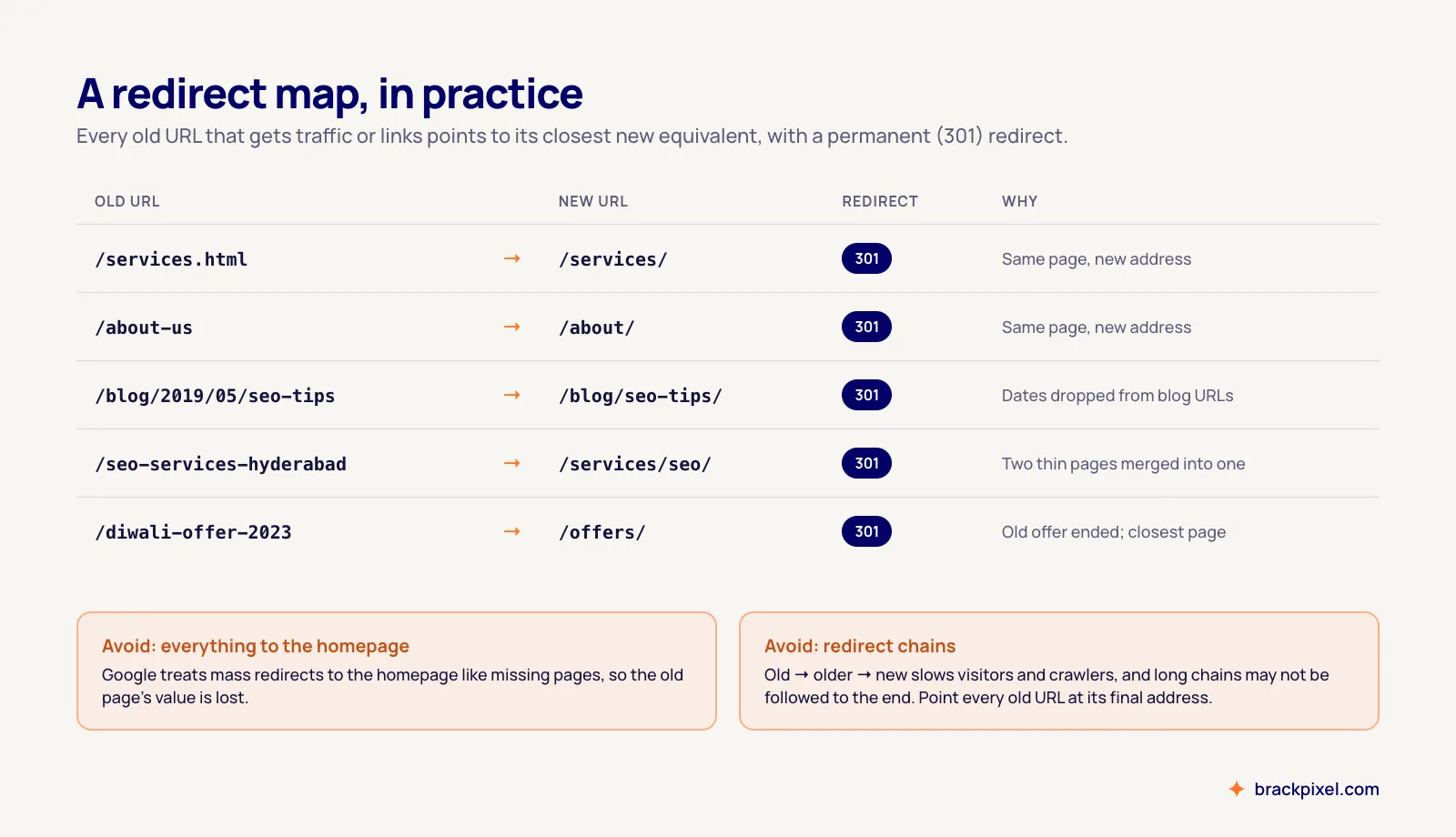
Point each old page at its closest equivalent, not at the homepage. If a page is being dropped with nothing similar to replace it, a redirect to the most relevant section is fine, and genuinely dead pages can return a 404. Point old URLs straight at their final address rather than through a chain of redirects, and update your internal links to use the new URLs directly.
On the staging site
Keep the staging site out of Google with a password, not just a noindex tag or robots.txt rule that someone might copy to the live site. Then test it like a search engine would: crawl it, check that every important page from your inventory exists, that titles and headings carry over, that structured data validates, and that pages are fast on a phone over mobile data, not just on office Wi-Fi.
Launch day checklist
- All 301 redirects are live. Test a sample of old URLs, especially the top-traffic ones.
- No noindex tags on live pages, and robots.txt isn't blocking anything important.
- Canonical tags point to the new live URLs, not to staging.
- A new XML sitemap is live and submitted in Search Console.
- Analytics, conversion tags, call tracking and forms all work. Send a test enquiry.
- Use URL Inspection in Search Console on your top pages and request indexing.
Launch early in the week, not on a Friday evening. If something breaks, you want people around to fix it.
The first six weeks after launch
Some movement in rankings after a relaunch is normal while Google recrawls and reprocesses the site, so don't panic over the first few days. What matters is the trend. Check the Pages report in Search Console for new 404s and pages that drop out of the index, and fix them as they appear. Compare traffic and conversions on your top pages against the benchmark you saved.
If a page that used to rank has dropped and stayed down after a few weeks, compare it with the old version: what content, headings or internal links were lost? Usually the answer is obvious once you look side by side, and restoring it brings the page back.
Changing your domain too?
Moving to a new domain at the same time as a redesign adds risk, because Google has to transfer everything to the new address. If you can, do one change at a time. If you must do both, the same redirect map applies across domains, and Search Console's Change of Address tool tells Google about the move.
None of this is glamorous, and none of it shows up in the design mock-ups. But it's the difference between a new website that brings more enquiries than the old one and a new website that quietly costs you customers for months.
Planning a new website in Hyderabad? We build sites with SEO and redirects planned in from day one.
Talk to us